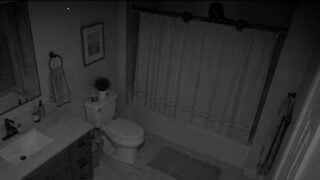
There are quite a few Roblox horror games that have you trying to pick out weird creatures from normal visitors. Anomaly Cafe, Animal Hospital, Hell Rails to name a few. Anomaly Detected makes this much more challenging. Rather than checking people for non-people traits, you’re going to have to be extremely observant to handle the shift. We put together this guide on how to play Anomaly Detected to share our experience on how to make it easier.
How To Play Anomaly Detected
The Basic Premise
In Anomaly Detected you are working for clients that are experiencing some unsettling activity on their property. They want you to monitor the cameras there overnight to find evidence of anything that appears unnatural so that it can be dealt with. Some things are subtle, things like misplaced objects, darker shadows, small things missing. Other times, well, you can get a look at some of the pictures to give you some idea.
How To Work Your Shift
So the process of playing Anomaly Detected is pretty simple.
Click through the different security cameras set up in the property.Look for anything that appears out of the ordinary.If you see anything that looks off, report it under the correct category.If you successfully identify the anomaly and the anomaly type, then it is removed, and it’s marked towards your quota.
Anomaly Types
…pretty sure that’s classified as an Entity Presence.
One of the crucial parts of playing is deciding on the correct anomaly type. There are nine different categories. We’ll briefly explain each of them.
Object Relocation
An existing object has moved to a different spot.
Object Rotation
An object is in the same spot, but rotated.
Missing Object
An existing object has disappeared.
New Object
A previously unknown object has appeared.
Structural Change
There’s been a change relating to a building or large parts of buildings. Anomalies like disappearing doors, changes to walls or ceilings fall under this category.
Lighting Change
A light that should be on is off, a light that should be off is on.
Surface Change
A surface looks markedly different.
Misplaced Shadow
A shadow with nothing that appears to be making it, or existing shadows changing shape.
Entity Presence
You should know these when you see them.
If you mark something as the wrong anomaly type, it counts as a ‘fail’. If you use up all your fails, it’s game over for you. The client will get impatient and fire you, and you won’t make any money for the run. Similarly, if you allow too many anomalies to stay spawned in for too long, they’ll overwhelm the area, and you’ll also get fired.
Chapters
If you can complete one run-through of a location and meet your quota, on any difficulty rating, you should get access to the next chapter, which brings you to a new location.
Chapter One – The ResidenceChapter Two – The NeighbourhoodChapter Three – The SchoolChapter Four – The Hospital
As of the writing of this guide, a new chapter, Chapter 5, The Mall, is due to release on September 20th.
Items
In the main menu, you’ll find the Store, a button on the left side of the screen. This gives you the chance to get your hands on some items that can make your job a little easier. You can buy them with money, which you’ll get at the end of a shift, even if you don’t pass, as long as you don’t get fired.
Anomaly Remover – $25
Removes one anomaly in the viewed area when used, without you needing to know the category.
Anomaly Room – $35
Single use. Will name a room/area that has an active anomaly in it.
Anomaly Spawner – $50
Single use. Encourages an anomaly to spawn.
Anomaly Type Scanner – $85
Single use. Tells you the category of anomalies active throughout the stage.
Global Anomaly Remover – $100
Single use. Gets rid of every active anomaly in the stage at the time it’s triggered. (This doesn’t mean new ones won’t spawn in, though.)
Anomaly Scanner (Permanent) – $2,500
Allows you to check the number of anomalies active on the stage at any one time. (With cooldown.) and can also tell you if an anomaly is active in the area you’re viewing.
Useful Tips
Anomaly Detected is hard. There’s no getting around that. There are a number of things that can make your life a lot easier though, and we’ve listed those below in case you’re struggling.
Be okay with failing the first few times.
It can take a while to memorize object placements, you probably won’t get it all on the first try. Focus on making sure you don’t use all your fails and make sure you don’t get too many entities active at once. You can use the money you earn on items that will make things easier later on.
Turn off the static settings.
You can turn the static off in the settings menu, this can make the view much clearer.
Entities are actually good news.
Sure, they’re creepy, but they are a really easy +1 to your capture counter. So be pleased when you see one.
The post How To Play Anomaly Detected appeared first on Gamezebo.
No responses yet