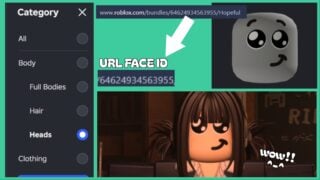
Don’t pout, not that you know how to do that yet, I imagine. But, before long, I’ll show you how to find Rintama High Face IDs, so you can pout, shout, smile, frown, or pull any sort of faces you want!
Let’s get right into it.
We also have a sister guide to this one covering Rintama High Hair ID!
Rintama High Face IDs
To source a Face ID, you need to open the Roblox Marketplace and set the filter to Heads. From here, window-shop for an expression or face shape that suits you. Consider the expression’s height and facial placement, and how it will translate when bringing your ideal player together.
After you find a face, check the URL (this is easier to do on PC), and find the numerical strip after the main Roblox URL. It will appear something like this: www.roblox.com/catalog/NUMBERS/item-name.
Copy this number code and insert it into the Head/Face ID bar in-game, press Enter, and wait for the game to reload your avatar with the face. If you don’t like how it looks, simply go back to the marketplace, find a new code, and override it by inserting it in-game and pressing Enter again.
Hair ID Preview
Frequently Asked Questions
Do 3D Head IDs work?
Yes! They might look a little strange depending on what you import, but they do indeed work.
Are other customisable IDs the same?
Pretty much. Clothes (Shirts/Pants) and Head IDs work the same way, importing exactly as shown from the marketplace. You just need to source the numerical ID from the URL.
Hair IDs import the same way via URL ID, but their colour becomes overridden based on your pre-rolled hair colour in-game. So if you import blonde hair and the game has set your natural colour as brown, the hair will appear brown. This also means all accessories attached to a hairstyle will become the default hair colour, so hair with accessories DOES work, but doesn’t look good.
Can I change my Face ID after finishing customisation and joining the game?
Yes! Join the game and open your Phone by pressing the Phone button from the top-left hotbar. Then, select Settings and open the customisation menu. This will bring you back to the title screen customisation menu from when you first create a save. Fortunately, you can edit anything here from gender to name, IDs, rerolls, etc.
Start Playing Rintama High
Now you know how importing IDs works, get glamorising via Roblox.
Don’t forget, we also have a Rintama High Hair IDs guide if you want to learn more about how to find good hairs to use.
The post How To Find Rintama High Face IDs appeared first on Gamezebo.
No responses yet