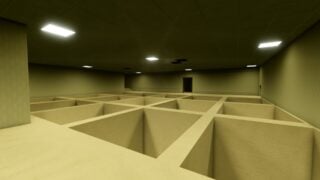
Unseen Liminality is an unusual bit of Roblox horror, in that it actually got me once or twice. I’ve put some hours into this Kane Pixels’ Backrooms-themed horror title recently, and while it’s in its early stages of development, it can be extremely unsettling when it wants to be. I’ve been studying the levels, and how some of the entities work to reduce the mystery a little, and I’ve put together this Unseen Liminality walkthrough with my findings. Think of it as a beginner’s guide on the game, and a warning of what to expect.
Unseen Liminality Walkthrough
Okay, now I’ve done enough intro it’s time to talk about the game.
The Objective
The basic gist of Unseen Liminality is to make your way through the various areas of the backrooms, without something horrible happening to you. (Currently, the horrible things that can happen to you is fairly limited, but that is subject to change fairly soon. More on that later.) You are supposed to find Areas Of Interest, weird little set pieces scattered around the maps. There are 17 in all, spread across four big maps, and two subfloors. You should wander around and explore as thoroughly as you can. The maps are fairly big, and extremely maze-like, so it’s extremely easy to become lost.
Equipment
You have a few things on your person that may help you in your expedition.
Flashlight – Equip with with F. LMB to turn on/off. This is your standard light. It has unlimited power and is especially handy during power cuts.Camera – You can use this to take high-quality captures of areas in the game. Most of the screenshots used in the article are made with the help of the camera. (Honestly wish more games had this feature.)Album – Lets you view your photos. Best not opened while a Mimic is chasing you.
The Levels
Right now there are four major areas, with a few more carefully hidden subfloors. You can access the main floors through a level select. The subfloors you’ll need to discover through exploration.
The Lobby
This is where you get dropped in on starting, and is the classic Backrooms experience. Yellow, bar lights, stained carpets. It’s all very samey which makes it one of the tougher areas to navigate. Fake Players/Mimics seem to mostly appear here.
Dead Mall
Ever watched The Oldest View? The Dead Mall area is a bit like that. No sign of The Rolling Giant so far, but I’d be lying if I said I wasn’t listening out for the sound of wheels while I explored the area. You can access this through the room with the blue wallpaper in the Lobby, among other ways.
The Poolrooms
Another Backrooms classic backdrop, a weird world of white tiles and swimming pools. Accessed through a spiral staircase in The Lobby.
The Hotel
A strange hotel area with a maintenance section and lots of doors, some of which lead to even more doors. Be careful around this area, you might find that you’re being followed. Accessed through The Poolrooms.
Dreamcore Subfloor
This area with clouds and traffic cones is a self-contained area with only one entrance/exit and one area of interest.
Fruitiger Subfloor
Another hidden subfloor with a nostalgic aesthetic.
Hazards
Currently, the game isn’t super dangerous, but you do need to keep an eye out for a few nasty things lurking around in the hallways.
Fake Players
If you have Roblox friends on your list, there’s a chance you’ll run into a Fake Player . This happens when you get the usual Roblox notification that a friend has joined the experience. On examination though, the user won’t appear in the sidebar showing users in the experience. This tells you that it’s a Fake Player, a Mimic, and should be avoided. These Mimics may stalk you, and try to get close. If they can get within a short distance, they’ll drop their disguise and turn into a shadow person, before rushing you. This can kill you. From my experience I’ve only seen these spawn in the Lobby.
Mannequin
Suddenly being alone in this place doesn’t seem so bad.
This entity, resembling an armless shop mannequin, may start following you through the halls of the Hotel or Dead Mall. It will move closer when you’re not looking at it. Standard Doctor Who Weeping Angels rules. The good news, I tested this entity extensively, ran into it and idled around it. It didn’t damage me in any way, or get closer once it reached a certain radius. The bad news is it can teleport through closed doors, so if you were thinking about shutting it in one of the rooms, I tried it and it didn’t work.
????
There are times during my playthrough that I just abruptly took damage for seemingly no reason, leaving a large red splash on the wall where I was standing. What was that for?
Still Life
Still Life is an entity in the upcoming May 30th ‘Liminal Home’ update. We don’t have a lot of information on what this entity’s behaviour will be, or what it looks like. It may be tied to the upcoming Liminal Home area, though.
Headhunter
Headhunter is another upcoming entity, set to arrive at an ‘undetermined release date’, though the official Roblox event is pencilled in for June 5th. The Headhunter seems set to be the most dangerous thing in Unseen Liminality yet, with its arrival packaged with a ‘Passive Mode’ that will turn it off for players that want a less hazardous experience. You have been warned.
Badges
Rounded a corner to see this thing and almost had a heart attack.
There are several badges up for grabs right now. Most are pretty easy so far.
Meet Bob
Touch a Spongebob Balloon. You can find these in the Lobby. (It doesn’t seem to damage you or do anything terrible.)
Evil Duck
Find the Evil Duck in the Pool Rooms.
Lobby
Find the Lobby. (You start here by default anyway.)
The Pool Rooms
Find the Pool Rooms.
Liminal Hotel
Find the Hotel area.
Dead Mall
Find the Dead Mall area.
Dream Core
Find the Dream Core area.
The Promised Future
Find the Frutiger Aero area.
We hope this Unseen Liminality walkthrough has been helpful. I’ll be updating this as more content arrives, so feel free to check back in once new updates drop. Next one is May 30th. If you’re interested in more walkthroughs, I recently also did one for Hell Rails: The Scary Train, too.
The post Unseen Liminality Walkthrough appeared first on Gamezebo.
No responses yet