Heartopia is a free-to-play life simulation video game that takes place in a magical world, Whale Island. It offers a cozy and relaxing experience with no combat mechanics, allowing players to create daily, memorable moments. There are various activities Whale Island has to offer, and as players go on their daily routine, they can all enjoy some free rewards. Heartopia occasionally offers free rewards that players can redeem through special codes. In this guide, we will tell you all the available Heartopia Codes in February 2026.
All Active Heartopia Codes – February 2026
Here are all the active Heartopia codes that players can currently redeem.
q6p9m4a7k: 5x Wishing Star, 3x Mermaid Fish Attractor, 10x Fertilizer
a9l5k7m2r8: 5x Wishing Star, 3x Mermaid Fish Attractor, 10x Fertilizer
r4p8n6m2q9: 10x Wishing Star, 3x Mermaid Fish Attractor, 10x Fertilizer
heartopia10m: 10x Wishing Star
lifewithline: 10x Wishing Star
happy2026: 10x Moonlight Crystal, 8888 Gold
k7m9q2a8l5: 5x Wishing Star, 3x Mermaid Fish Attractor, 10x Fertilizer
true5mthks: 10x Quality Timber, 2x Chef’s Special Salad, 20x Branches
heartopia5m: 5x Wishing Star
r4a8x2n: 5x Wishing Star, 10x Growth Booster, 10x Orange
top1thanks: 5x Wishing Star, 2x Mermaid Perfum, 10x Mandarin
b8n2k5l: 2x Flawless Fluorite, 6x Rare Timber, 10x Stone
letsparty: 15x Wishing Star, 5000 Gold, 3x Repair Kit
dcthx4u: 10x Wishing Star
m7r9q4a: 2x Mermaid Perfume, 10000 Gold, 10x Egg
x2l8k6p: 5x Wishing Star, 10x Fertilizer, 10x Apple
h9q3a7m5: 2x Roaming Oak Timber, 10x Milk, 10x Timber
z4p6n8r2: 10x Quality Timber, 2x Chef’s Special Salad, 20x Branches
letsdressup: 15x Wishing Star, 5000 Gold, 10x Growth Booster
letsbuild: 15x Wishing Star, 5000 Gold, 10x Fertilizer
a7k9m2q8l: 5x Wishing Star, 3x Repair Kit, 10x Blueberries
How to Redeem Codes in Heartopia
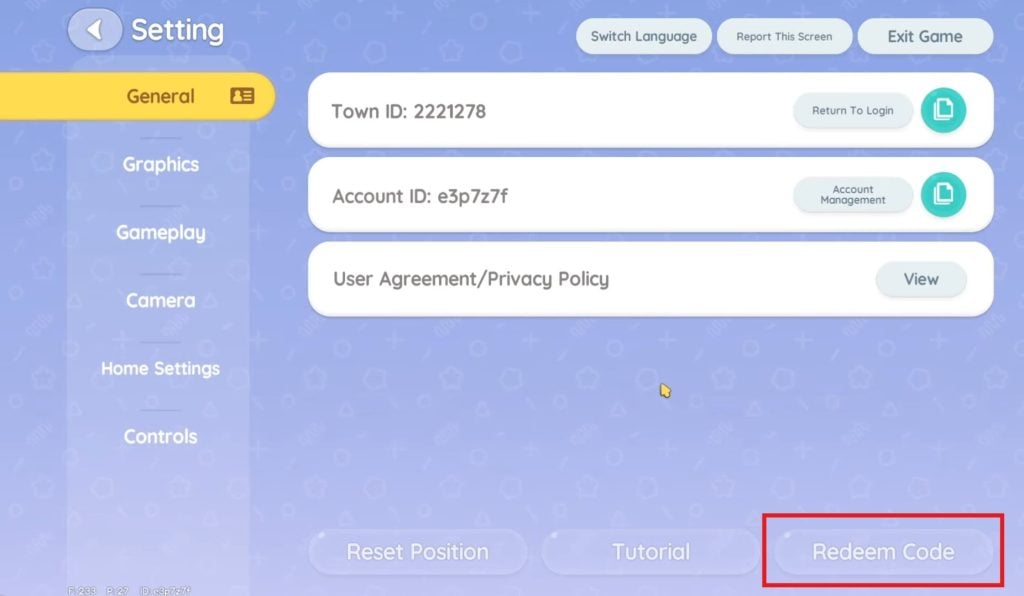
Open the player’s watch by either clicking on the watch icon or pressing the TAB key. Scroll down and select the “Settings” option. This will take you to the “General” settings tab. Here, you need to click on the “Redeem Code” option on the bottom right. It will open a window where you can type in or paste the code to redeem it.
NOTE: Type in the codes as they are. All codes are case sensitive.
As you select the “Redeem” option after entering the code, a message will appear in the window telling you to check your Mailbox for the rewards.
How to Claim Rewards from Mailbox in Heartopia
There are two ways to check your Mailbox or claim your rewards from it. The first quick and simple method is to open the Mailbox App on the watch. Press the TAB key to open the watch, then scroll down to find the Mailbox App. Open the App and click on the “Claim All” option to claim all the rewards.
The second method is interacting with the mailbox outside the player’s home. Interacting with it will open the same menu as the Mailbox App. Here, you can claim all of your rewards.
The post All Heartopia Codes February 2026 appeared first on Nintendo Smash: Video Games News, Reviews & Guides.
No responses yet