Exploring Lumiose City in Pokémon Legends: Z-A will make you come across various items, including consumables and mysterious items. One of the mysterious items is the Colorful Screw, as the game does not tell you what to do with it. You will see Poke Balls with a glowing purple light at various locations around Lumiose City. These are the Colorful Screws, which you can pick up. In this guide, we will tell you how to use the colorful screws in Pokémon Legends: Z-A.
What is the Colorful Screw in Pokémon Legends: Z-A
The Colorful Screw works as a currency in Pokémon Legends: Z-A, allowing players to exchange it for Canari Plushies. There are a total of 100 Colorful Screws in Lumiose City that players can acquire by picking up the bright purple Poke Balls. The glowing purple Poke Balls are on top of scaffolding around Lumiose City, and each gives 1 Colorful Screw. So, if you pass by any scaffolding, climb up to it to find a Colorful Screw.
How to Use the Colorful Screws in Pokémon Legends: Z-A
The game does not give you instructions on how and where to use the Colorful Screws in Pokémon Legends: Z-A. It has only one use, and that is to exchange for various Canari Plushies. The Canari Plush is not a cosmetic item, but it grants passive bonuses. The Canari Plush comes in five different colors, and each color plush grants a unique passive bonus.
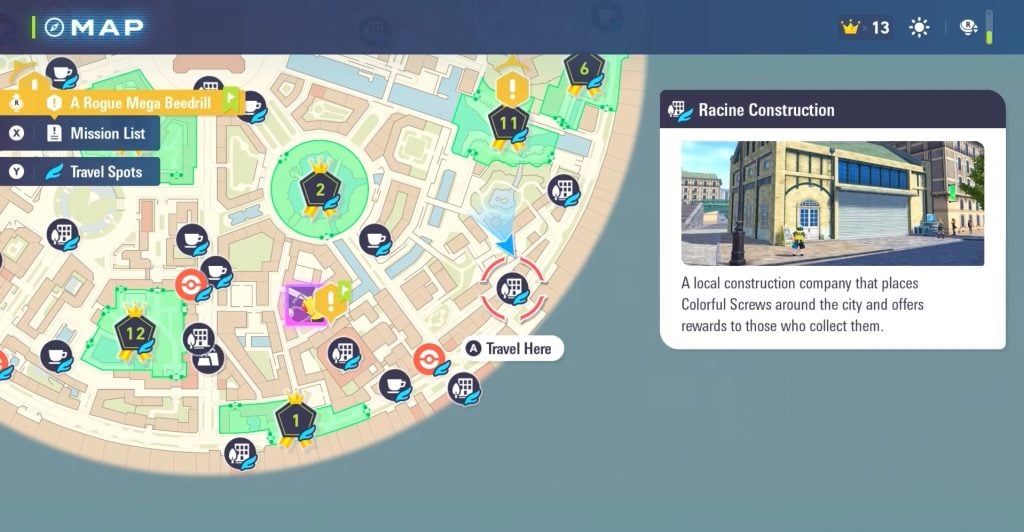
Now, to get the Canari Plush, you have to trade the Colorful Screws at Racine Construction Company. It is located on South Boulevard, southeast of Lumiose City. As you come here, you will see a construction worker with whom you can interact and exchange Colorful Screws.
How to Unlock Racine Construction Company
However, the Racine Construction Company is not available from the start. The players will have to unlock this location by progressing in the main story. To be exact, players must complete Main Mission 14 to unlock Racine Construction. It is the same mission where you have to defeat Canari to reach Rank E.
All Canari Plushies and Their Effects
There are five colors of Canari Plushies in Pokémon Legends: Z-A. Each Canari Plush starts with Level 1 and goes up to Level 3. The higher the level, the higher the effect of the passive bonus it offers.
Canari PlushEffectPriceRed Canari PlushIncreases the Exp. Points your Pokémon get.Level 1: 3 Colorful Screws Level 2: 5 Colorful Screws Level 3: 8 Colorful ScrewsGold Canari PlushIncreases the prize money you receive from battles.Level 1: 3 Colorful Screws Level 2: 5 Colorful Screws Level 3: 8 Colorful ScrewsPink Canari PlushIncreases the number of Mega Shards you’ll find after smashing Mega Crystals.Level 1: 3 Colorful Screws Level 2: 5 Colorful Screws Level 3: 8 Colorful ScrewsGreen Canari PlushMakes you a little less likely to black out from taking damage.Level 1: 3 Colorful Screws Level 2: 5 Colorful Screws Level 3: 8 Colorful ScrewsBlue Canari PlushMakes it a little more likely that you’ll succeed at catching Pokémon.Level 1: 3 Colorful Screws Level 2: 5 Colorful Screws Level 3: 8 Colorful Screws
To get all the Canari Plushies of Level 3, it will cost a total of 77 Colorful Screws. We recommend acquiring the Blue, Green, and Red Canari Plushies in the early game. After that, focus on getting the Pink and Gold Canari Plushies.
The post How to Use the Colorful Screws in Pokémon Legends: Z-A appeared first on Nintendo Smash: Video Games News, Reviews & Guides.
No responses yet