Pokémon Pokopia inspires players to create unique islands with thoughtful ideas and places to hang out with friends. Throughout the main story adventure of Pokopia, players will gather all sorts of materials, which they can utilize to come up with exotic builds. However, creating such places can be a hassle due to a long thought process and the actual time building them. Fortunately, the Cloud Islands play a big role in taking inspiration for other players, and even the Devs. The Developer Islands are like the go-to cloud islands in Pokopia to get an insight into end-game builds. Moreover, these islands offer every item from early to end-game, allowing you to take them and use them for your own builds. In this guide, we will tell you how to access Developer Islands with all items in Pokémon Pokopia.
How to Access Developer Islands with All Items in Pokémon Pokopia
Accessing the Developer Islands in Pokémon Pokopia requires you to meet some requirements, including a Nintendo Switch Online Subscription, Environment Level 3 or higher, Mysterious Goggles, and a cloud island code. You cannot access the Developer Islands if you do not meet any of the mentioned requirements. Make sure that you have the Nintendo Switch Online subscription to access the Link Play to use the Cloud Island feature. Moreover, you must progress the island until it gets to Environment Level 3 to unlock advanced exploration features.
How to Get the Mysterious Goggles
Mysterious Goggles are an essential item for typing the code to a cloud island. To get the Mysterious Goggles, purchase them from any PC Shop at the Pokémon Center. If you have rebuilt the Pokémon Center at the Withered Wasteland, the Mysterious Goggles will be available for purchase.
How to Enter Codes for Developer Islands
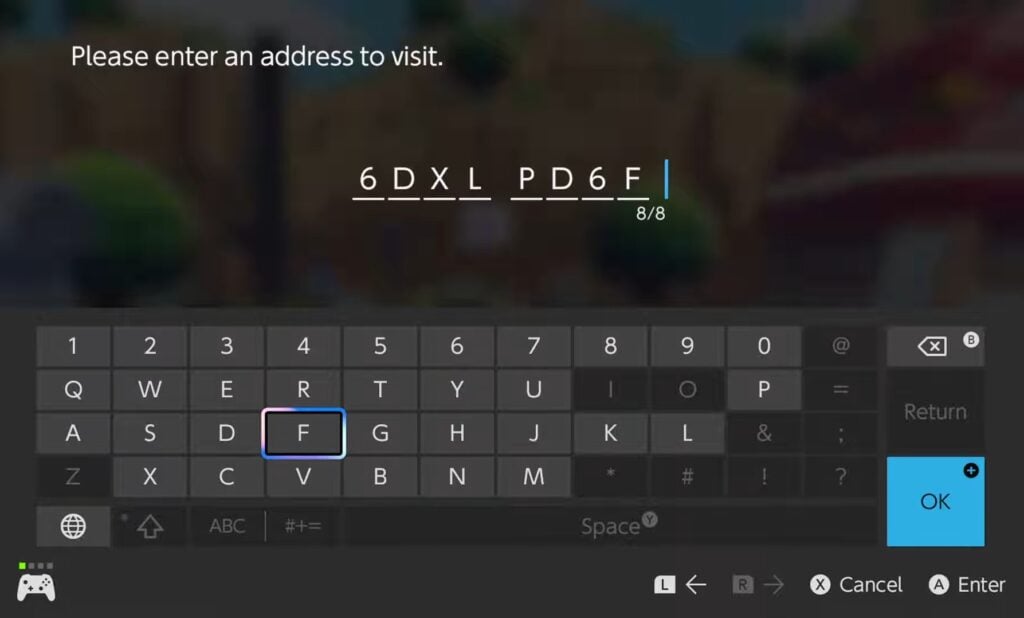
After acquiring the Mysterious Goggles, equip them, and then head to the Link Play. Here, the goggles will open up a code screen. Enter any developer island codes to visit the island. Here are two codes for the popular Developer Islands in Pokémon Pokopia.
Code 1: PXQC G03S
Code 2: 6DXL PD6F
Both of these islands are filled with some of the most complex and appealing places, with all sorts of Pokémon roaming. Moreover, there are underground cavern systems with more places. It is essential that you take time visiting these islands to get a good inspiration for your cloud island.
How to Copy Items from Developer Island
The Developer Islands contain every single item in the game. If there is any item you want, either for your progression, restoring a habitat, or decorating the island, you can find it here. However, you cannot simply take it; you have to copy the items and print them back at the Pokémon Center. Here is how it works.
Open the Camera by pressing the “-” button.
Switch the camera mode to Copy Mode by pressing the “Y” button.
Take a picture of any item, including a furniture item or a material.
Open the Pokedex to go back home.
Head to the 3D Printer at any Pokémon Center.
Select the photo and pay the price of a Pokemetal to print out the exact item from the photo.
NOTE: Rare items cost more Pokemetal to print out.
You can use this technique to complete your Habitat Dex and fulfill your collection of Pokémon in Pokopia.
The post Pokémon Pokopia: How to Access Developer Islands with All Items appeared first on Nintendo Smash: Video Games News, Reviews & Guides.
No responses yet