Progressing in Heartopia will require you to gather numerous materials, resources, and decorative items. You can use the materials to craft more furniture items and use the resources to cook delicious meals. All of these items will take a slot in your backpack inventory. Managing the inventory poorly will fill up the backpack quickly, making it difficult for you to gather other items during your day. In this guide, we will tell you how to increase inventory slots in Heartopia.
How to Increase Inventory Slots (Backpack Expansion) in Heartopia
The Backpack Expansion is an upgrade for the player’s backpack that increases the maximum capacity. Ka Ching sells the Backpack Expansion in exchange for Wishing Stars (currency). She can be found roaming around the outskirts of the City Center. However, every NPC has a different schedule. It is best to track her on the map to locate her easily.
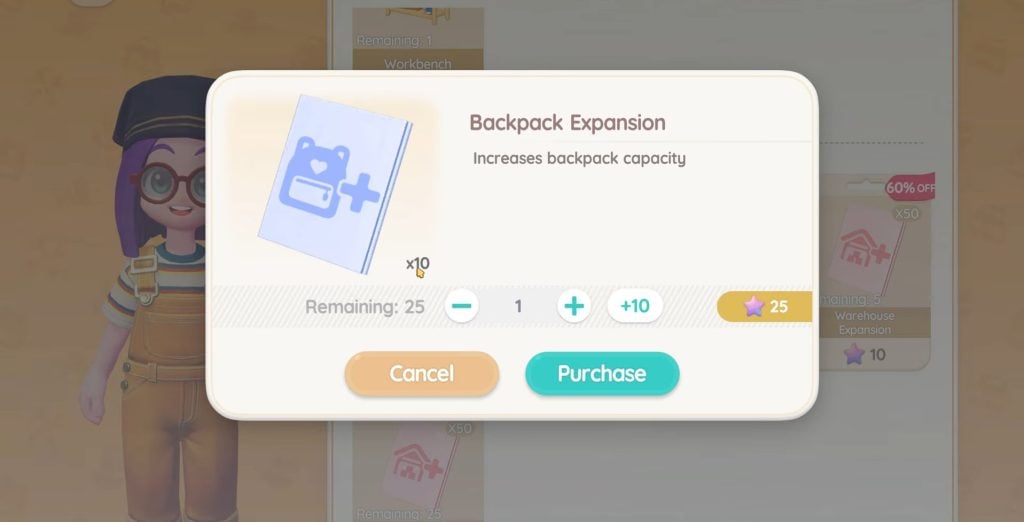
The first backpack expansion is free from Ka Ching. After that, she will charge you Wishing Stars for every expansion. There are two expansion sizes, small and large. The small expansion costs 5 Wishing Stars,and the large expansion costs 25 Wishing Stars.
Go to Ka Ching and speak with her. Browse the General Store and pick the Backpack Expansion you want to purchase. Upon purchasing the expansion, the inventory slots will immediately enlarge.
TIP: It is better to purchase the Large Expansion, especially on 60% discount. If you see Ka Ching running a discount, purchase the expansion to save Wishing Stars.
How to Manage Inventory in Heartopia
Purchasing the expansion will help you greatly in gathering more items, but it does not help you with the management. To manage the inventory effectively, you must also have a big storage space for the Warehouse. The Warehouse is where you can store items from the backpack. Go to your house, and you can store any item from your backpack. It is best to store decorative and furniture items in the warehouse. Keep the materials and resources in your backpack for crafting, cooking, and feeding purposes.
However, there is a limit for Warehouse space. You can purchase the Warehouse’s additional slots from Ka Ching as well. The price for Warehouse Expansion is also 25 Wishing Stars. So, if you are running out of warehouse storage, do not forget to purchase its expansion as well. Moreover, if the expansion is on sale, purchase it to save more Wishing Stars.
The post How to Increase Inventory Slots in Heartopia appeared first on Nintendo Smash: Video Games News, Reviews & Guides.
No responses yet