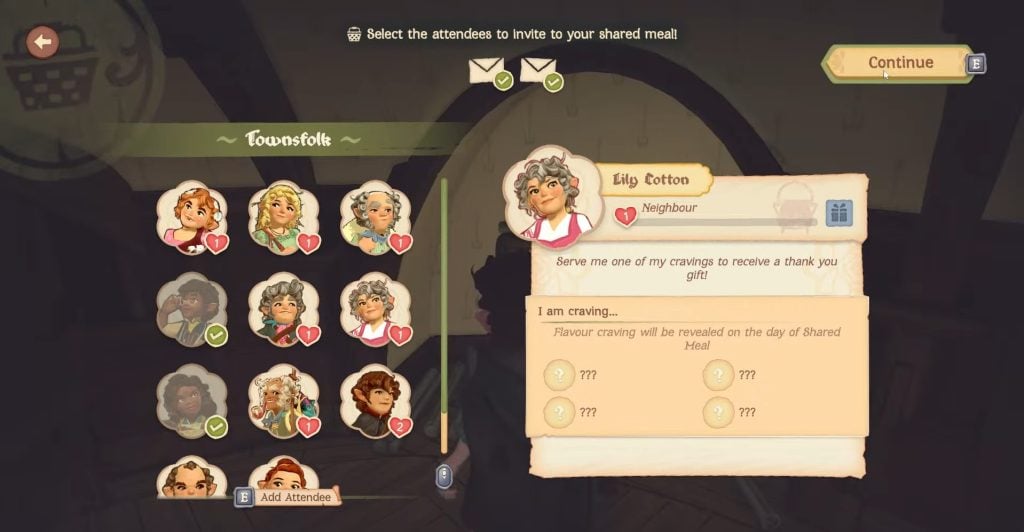
Hosting meals for the townsfolk is the main way to progress in Tales of the Shire. It helps you increase your friendship with the townsfolk and build a community. As you strengthen your relationship with the townsfolk, they will reward you with new recipes, ingredients, and decorative items. It is essential to learn the process of inviting the villagers for a Shared Meal every now and then. In this guide, we will tell you how to invite villagers for a Shared Meal in Tales of the Shire.
What is a Shared Meal in Tales of the Shire
The Shared Meal is a small gathering event between you and two – five other villagers at a venue. You invite the selected villagers to a certain venue and present them with their favorite/requested meals. As you begin the Shared Meal event, the guests will give a gesture to the meals. If they like the meal, they will show a happy gesture; if the meal is not according to their expectation, they will show a disappointing gesture. As they show the gesture, you will earn the friendship points accordingly. So, it is best to present your guests with sublime meals. You will learn the liking of villagers as you invite them more. The encyclopedia shows the overall friendship with each villager and what they like and do not like.
How to Invite Villagers for a Shared Meal
To begin with the Shared Meal, the first step is to send invites to the villagers you want to invite. Go to your Hobbit-hole and make your way to the dining room. Here you will see a Writing Desk. Interact with it and select the “Plan a Shared Meal” option. After that, you will get to select a venue for the Shared Meal. Initially, you can choose the “Home” and “The Three-Farthing Stone” locations as a venue. The Home is suitable for up to two villagers, and the Three-Farthing Stone is suitable for up to four villagers.
After selecting the venue, a Townsfolk menu will open, showing all of the villagers. You need to select a number of villagers you want to invite. Moreover, you will also see the cravings of the villagers on the right side. if a villager wants something sweet to eat, you must cook a meal with a Sweet Flavor for them. After selecting the villagers, select the “Continue” option on the top right side of the screen. It will move you to the final screen of sending invites. Select the “Send Invites” option to confirm the Shared Meal event for the invited villagers.
NOTE: The Shared Meal event always takes place the next in-game day. However, there is no specific time for it.
Prepare the Meals and Start the Shared Meal
After sending out the invites, you must prepare the meals for the villagers. You cannot host a Shared Meal without the meals. Go to the Kitchen to start cooking the favorite meals of your guests. Once done, you can go on with your day and sleep at night to start the next day. As the next day begins, you can start the Shared Meal at any time by interacting with the table in the dining room.
After starting the Shared Meal, you need to place the meals in front of the guests. However, make sure to place the correct meals in front of each guest. It is because the guest will only eat the meal that is in front of them. So, do not mix up the meals while placing them on the table.
Once the guest have eaten their meals and given the gestures, you will say goodbye to them and the Shared Meal activity will end. Fulfilling townsfolk’s expectations will let you learn more about them and unlock new recipes as you increase friendship level with them.
The post How to Invite Villagers for a Shared Meal in Tales of the Shire appeared first on Nintendo Smash: Video Games News, Reviews & Guides.
No responses yet