Starting as a small-time drug dealer with only a few hundred dollars to your name can be tough in Schedule 1. You cannot simply start selling drugs to the locals to earn yourself a name and a complete empire. It will require you to first make customers by giving out free samples, assemble your manufacturing place, build connections, unlock more suppliers and dealers, own different businesses and properties, and much more. All of this requires dedication and hard work to achieve. However, if you are having a difficult time earning money or getting around with the products, you can use cheats and console commands. In this guide, we will tell you all the cheats and console commands that you can use in Schedule 1.
How to Enable Cheats and Console Commands in Schedule 1
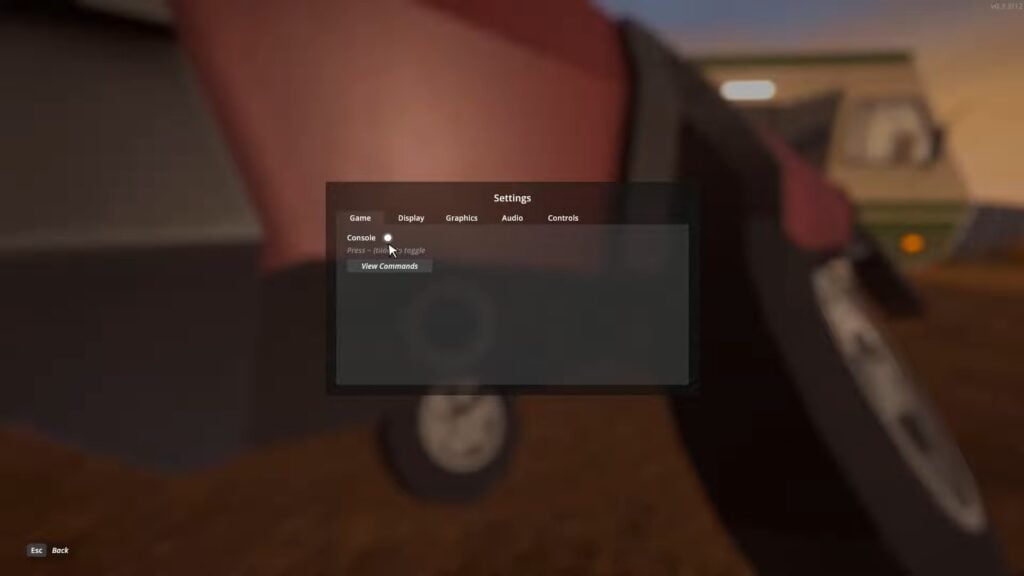
Before you can use any cheat and console command in Schedule 1, you must first turn on a setting. To do so, open the main Settings and turn on the “Console” option. You can find this option under the Game tab, the first tab of the Settings. Click on the white circle in front of the Console option to turn it on.
After turning on the Console option, you can press the tilde (~) key on the keyboard to activate the Console in Schedule 1. This will open a Console Bar at the top of the screen. Type in a console command and press the Enter key to activate the cheat.
All Cheats and Console Commands in Schedule 1
Below, you can find all the cheats and console commands that you can freely use in Schedule 1.
Console CommandDescriptionExamplefreecamToggles free cam modefreecamsaveForces a savesavesettimeSets the time of day to the specified 24-hour time.settime 1530giveGives the player the specified item. Optionally specify a quantity.give ogkush 5clearinventoryClears the player’s inventoryclearinventorychangecashChanges the player’s cash balance by the specified amountchangecash 5000changebalanceChanges the player’s online balance by the specified amountchangebalance 5000addxpAdds the specified amount of experience pointsaddxp 100spawnvehicleSpawns a vehicle at the player’s locationspawnvehicle vehicle nameset movespeedSets the player’s move speed multipliersetmovespeed 1setjumpforceSets the player’s jump force multipliersetjumpforce 1teleportTeleports the player to the specified locationteleport townhallsetownedSets the specified property or business as ownedsetowned barnpackageproductPackages the equipped product with the specified packagingpackageproduct jarsetstaminareserveSets the player’s stamina reserve (default 100) to the specified amountsetstaminareserve 200raisewantedRaises the player’s wanted levelraisewantedlowerwantedLowers the player’s wanted levellowerwantedclearwantedClears the player’s wanted levelclearwantedsethealthSets the player’s health to the specified amountsethealth 100settimescaleSets the time scale. Default 1settimescale 1setvarSets the value of the specified variablesetvar < variable >< value >setqueststateSets the state of the specified questsetqueststate < questname >< state >setquesentrystateSets the state of the specified quest entrysetquestentrystate < questname >< entry index >< state >setemotionSets the facial expression of the player’s avatarsetemotion cheerysetunlockedUnlocks the given NPCsetunlocked npc_idsetrelationshipSets the relationship scale of the given NPC. Range is 0-5setrelationship npc_id 5addemployeeAdds an employee of the specified type to the given propertyaddemployee botanist barnsetdiscoveredSets the specified product as discoveredsetdiscovered ogkushgrowplantsSets ALL plants in the world fully growngrowplantssetlawintensitySets the intensity of law enforcement activity on a scale of 0-10setlawintensity 6setqualitySets the quality of the currently equipped itemsetquality standardbindBinds the given key to the given commandbind t ‘settime 1200’unbindRemoves the given bindunbind tclearbindsClears ALL bindsclearbindshideuiHides all on-screen UIhideuidisableDisables the specified GameObjectdisable ppenableEnables the specified GameObjectenable ppendtutorialForces the tutorial to end immediately (only if the player is actually in the tutorial)endtutorialdisablenpcassetDisabled the given asset under all NPCsdisablenpcasset avatarshowfpsShows FPS labelshowfpshidefpsHides FPS labelhidefpscleartrashInstantly removes all trash from the worldcleartrash
You can also view all the console commands inside the game. Select the “View Commands” option under the console option in the Game tab to see all the console commands. All of the console commands and cheats are readily available in Schedule 1. You can use them at any time, and they will not negatively impact your game.
That is all related to all the Cheats and Console Commands in Schedule 1.
The post All Cheats and Console Commands in Schedule 1 appeared first on Nintendo Smash: Video Games News, Reviews & Guides.
No responses yet